Release Notes
Latest release
The current release of Positron is 2026.10.2-3.
Patch notes
The 2026.10.2 patch release (2026-10-26) updates Electron and Node.js for security fixes. This includes a block on the compromised eMudhra intermediate certificates, for both the desktop app and remote sessions.
The 2026.10.1 patch release (2026-10-19) fixes a problem with Snowflake Data Connections that use managed credentials on Posit Workbench.
Release highlights
Welcome to the 2026.10.0 release of Positron!
- Posit Assistant can drive Positron
- Bring your own coding agent
- Data Connections on by default
- Faster language features for Quarto
- Python project setup
Posit Assistant can drive Positron
Posit Assistant can now operate Positron itself, not just the R or Python session inside it. Ask it to run a Shiny app, open a Parquet file in the Data Explorer, set up a Python environment, browse your data connections, or deploy to Posit Connect. It uses the same source of truth as the Positron UI, so it sees your real interpreters, packages, and connections.
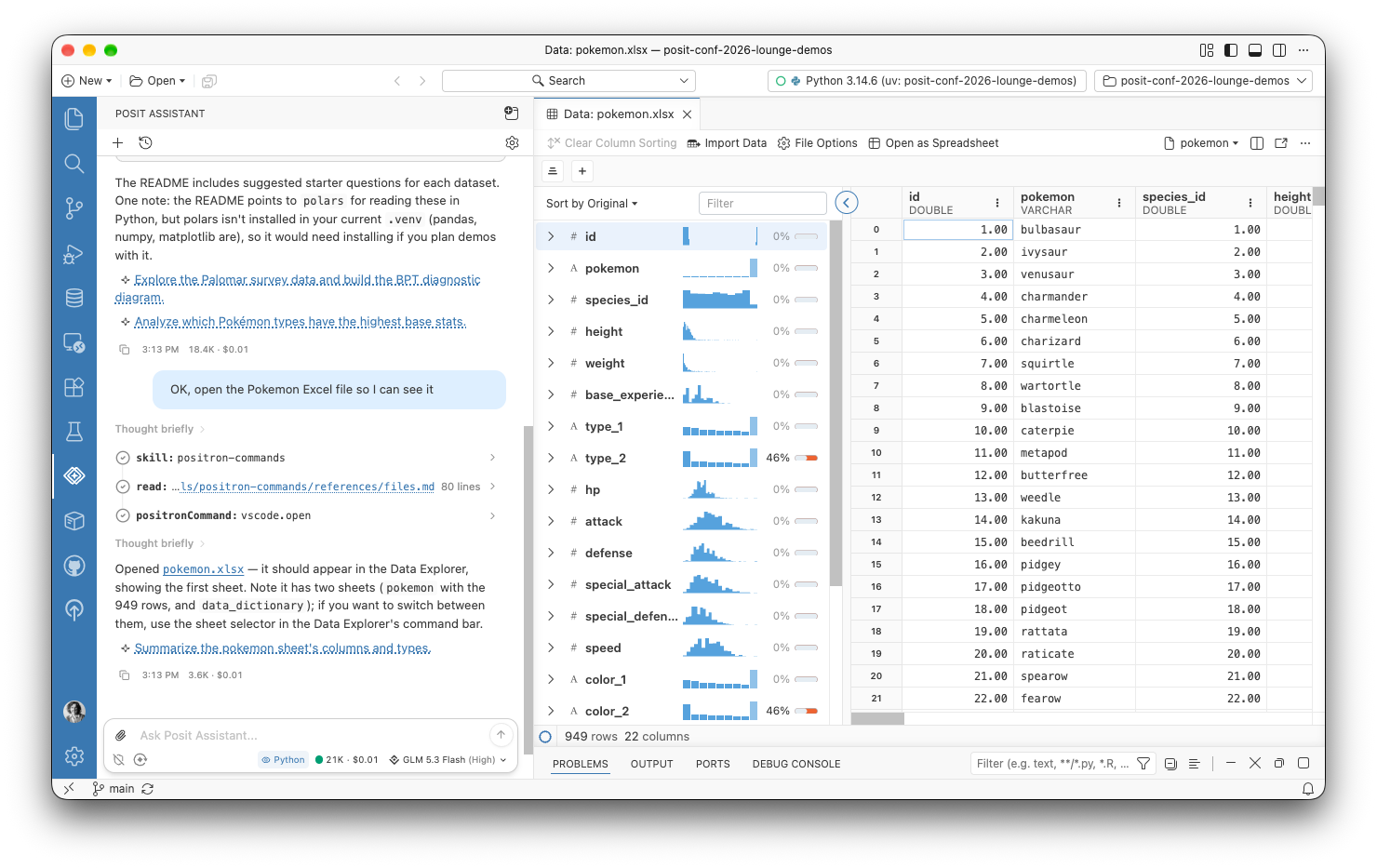
To try this preview feature, enable the assistant.previewFeatures setting, and tell us what you think in the GitHub discussion.
Bring your own coding agent
A new built-in Model Context Protocol (MCP) server lets coding agents such as Claude Code, Codex, and Gemini CLI work in your live Python and R sessions. Agents can run code, look at plots, and run Positron commands, and the Console labels the code that an agent runs. To try this experimental feature, enable the ai.mcp.enabled setting. Positron configures Claude Code for you, and Positron MCP: Add to Coding Agent sets up the Codex and Gemini CLIs.
Data Connections on by default
Data Connections is now the default way to work with databases and data warehouses, and it supersedes the Catalog Explorer and Connections pane. Amazon Redshift connections can sign in with AWS Identity and Access Management (IAM), and Snowflake and Databricks connections on Posit Workbench can use managed credentials. Snowflake semantic views show in the tree, and Connect With can generate ggsql code. To use the older Connections pane, set dataConnections.enabled to false.
Faster language features for Quarto
Positron now provides completions, hover, diagnostics, and other language features natively for R and Python cells in Quarto and R Markdown documents. Before, the Quarto extension wrote temporary virtual documents to disk for these features. Positron now uses a virtual notebook in memory instead, which is faster and solves a whole category of bugs. It also lets Go to Definition and Find References work across R cells. If you run into problems and need to go back to the old behavior, use the quarto.embeddedLanguageFeatures.native setting.
Python project setup
Positron is better at setting up the right Python environment for your project. When a workspace has a uv.lock or pixi.lock file but no environment, Positron offers to create it. If uv is missing, the New Folder flow can install it for you. Interpreter path settings for Python and R now support ${workspaceFolder}, so a project can point to an interpreter inside it.
Changelog
New features
- [#16288] Connections: the Data Connections pane is now the default connections experience. To use the older Connections pane, set
dataConnections.enabledtofalseand reload the window. - [#14665] Connections: Amazon Redshift connections can sign in with AWS Identity and Access Management (IAM), for both Redshift Serverless and provisioned clusters. Credentials come from the standard AWS credential provider chain.
- [#14666] Connections: Snowflake and Databricks connections on Workbench can use the Workbench managed credentials of the session, with no credential input.
- [#15157] Connections: the Data Connections pane shows Snowflake semantic views and their tables, dimensions, facts, filters, metrics, and relationships. Click an item to open a details editor.
- [#14051] Connections: DuckDB and SQLite files that you open from the Explorer show a page that offers to create a data connection or open an existing one.
- [#15126] Connections: the Add Data Connection dialog lists each driver with a short description and its own Connect button.
- [#14653] Connections: the Data Connections pane shows details for Snowflake databases, schemas, tables, views, stages, and stage files. You can browse Snowflake stages as folders and files.
- [#14653] Connections: Data Connections pane items offer Copy Name and, where they have a path, Copy Path. Details editors offer Open in Data Explorer for items you can preview.
- [#16009] Connections: Connect With can generate ggsql code for SQLite, DuckDB, ODBC, PostgreSQL, and Redshift connections.
- [#16163] Connections: Positron shows a notification when a data connection fails to open or expand.
- [#15704] Assistant: Posit Assistant can run and preview Dash, FastAPI, Flask, Gradio, marimo, Streamlit, and Shiny apps with the app commands of Positron.
- [#15940, #15941] Assistant: Posit Assistant can see which data apps are running, with their status and URL, and stop them.
- [#15592] Assistant: Posit Assistant can read your configured and detected data connections, get the code to open one, and browse its schema. It connects first if the connection is not open.
- [#15450] Assistant: Posit Assistant can tell which interpreter a project uses. It can also explain why an installed interpreter does not show, and make that interpreter available.
- [#16035] Assistant: Posit Assistant knows the commands it can use to deploy to Connect through Posit Publisher.
- [#8636] Assistant: Posit Assistant can show HTML files and URLs in the Viewer pane.
- [#15099] Assistant: AI agents such as Posit Assistant can read, take screenshots of, and use data apps and other content in the Viewer pane.
- [#16029, #14477] Assistant: Git suggestions and notebook AI features can use custom and local providers.
- [#15672] Assistant: Posit AI Pass now logs why it is off, and where to turn it on.
- [#14709] Assistant: removed the deprecated AI provider settings. Configure AI providers in
~/.posit/ai/providers.json. - [#14390] Python: Positron offers to create the environment with
uv syncorpixi installwhen a workspace has auv.lockorpixi.lockfile but no environment. - [#13104] Python: when uv is missing, the New Folder flow can install it for you.
- [#5556] Python: function completions now insert parentheses by default.
- [#10389] Python: interpreter path settings (
python.interpreters.include,.exclude,.override, andpython.defaultInterpreterPath) now support${workspaceFolder}, so a project can point to a Python installed inside it. - [#15463] Data Explorer: shows a progress indicator while a slow table or view loads, and placeholders for cells, column headers, and row labels that have not arrived yet.
- [#15463] Data Explorer: loads column summaries in two passes and sizes requests to what the source can deliver. Slow sources show missing-value counts quickly and sparklines later.
- [#10389] R: interpreter path settings (
positron.r.customBinaries,customRootFolders,interpreters.exclude,interpreters.override, andinterpreters.default) now support${workspaceFolder}, so a project can point to an R installed inside it. - [#15571] R:
rstudioapi::getActiveDocumentContext(),getSourceEditorContext(),insertText(), anddocumentPath()now target the console when it has focus, as in RStudio. The documentidis"#console"for the console. - [#16196] MCP: a built-in MCP server lets coding agents such as Claude Code, Codex, and Gemini CLI use your Python and R sessions. To try it, enable the experimental
ai.mcp.enabledsetting. - [#16336] Console: console tabs show a dot when code runs in a console that you are not looking at, such as code from Posit Assistant or an external agent.
- [#16281] Console: the console information hover shows why the session started, for example “You selected this interpreter”.
- [#14540] Quarto: Positron natively provides completions, hover, diagnostics, outline, formatting, and more for R and Python cells in Quarto and R Markdown documents. To go back, set
quarto.embeddedLanguageFeatures.nativetofalse. - [#7899] Interpreter: search in the interpreter picker now matches interpreter paths as well as names.
- [#12081] Interpreter: the new
interpreters.definitionssetting defines more R and Python interpreters, each with its own label, environment variables, and startup script. Positron lists each one next to the original interpreter. - [#14767] Interpreter: set the new
interpreters.discoverysetting todefinitionsOnlyto show only the interpreters ininterpreters.definitionsfor a language. - [#16077] New Folder: New Folder from Git lets you name the folder for the cloned repository, instead of always using the name of the repository.
- [#11020] Remote:
remote.serverDownloadUrlTemplateis the one download URL setting for the Secure Shell (SSH), Windows Subsystem for Linux (WSL), and Dev Containers extensions. The deprecated per-extension settings still take precedence. - [#6221] Remote SSH: Remote SSH can use the system OpenSSH client for connections and tunnels with the new
remoteSSH.transportsetting. - [#16005] Workbench: Positron on Workbench now loads translated UI text for your display language.
- [#15760] Help: added Posit Cheat Sheets to the Help menu.
Bug fixes
- [#15897] Python: Run App and Debug App now run the file whose button you clicked, not the file in the focused editor.
- [#15917] Python: when Python app files are open in editors side by side, each editor now shows Run App and Debug App for its own app.
- [#15916] Data Apps: when an app fails to start, Positron now tells you right away. Before, it waited for the URL detection timeout.
- [#14893] Python: when Positron finds a new Python environment in a workspace, it offers to start a console session instead of selecting a workspace interpreter.
- [#15385] Python: creating a uv environment from
pyproject.tomlnow uses uv configuration such aspython-preference. - [#15558] Python: reduced memory use when Positron looks for missing Python packages.
- [#15835] Python: package installs and the Packages pane now work with uv right after Positron installs it.
- [#15657] Python: completions for runtime objects no longer show two times when
python.analysis.completeFunctionParensis on. - [#15518] Python: Positron no longer offers to install a PyPI package for a local Python module that a Quarto document or notebook imports.
- [#6120] Python: Positron now defines
__file__when you run code from a file in the editor. - [#15735] Assistant: fixed a missing
inputSchemaon the View Active Plot tool for Posit Assistant. - [#15881] Assistant: Posit AI Pass sign-in and code completions now use the custom Posit AI login and gateway configuration in
providers.json. - [#15866] Assistant: View: Agent Layout no longer opens a second Posit Assistant tab when you run it again.
- [#16274] Assistant: removed the recurring “Authentication expired” notification for AI providers.
- [#15292] Assistant: fixed Posit Assistant sometimes failing with “No credentials available for provider: bedrock” when a Workbench session started before its AWS identity token was available.
- [#16051] Assistant: the provider dialog shows a third-party terms notice again, with the correct text for each provider.
- [#15755, #15802] Assistant: AI provider sign-in no longer fails when model discovery is off, or when the key check for a custom provider gets a server error.
- [#16422] Assistant: on Workbench, Posit Assistant now finds Microsoft Foundry managed credentials when the Workbench extension starts after the authentication extension. Before, Posit Assistant sometimes had no Foundry models.
- [#16477] Assistant: when you sign in to AWS SSO again for Amazon Bedrock, Positron no longer asks you to confirm that you want to open the AWS sign-in page.
- [#15819] Quarto: Run Cells Above and Run Cell and Below no longer stop at a Mermaid cell when you enable inline output.
- [#15957] Quarto: a document that starts with a diagram cell no longer uses the language of that cell as the document language.
- [#15792] Quarto: inline outputs and cell toolbars no longer lose track of their cells when you edit, delete, move, or reorder cells with identical content.
- [#16165] Quarto: running a multi-statement R cell in a document with Windows line endings no longer fails with a syntax error.
- [#13907, #15230] Quarto: the outline for Quarto and R Markdown documents no longer shows a second Quarto group or each code symbol two times.
- [#14512] Quarto: the outline for Quarto and R Markdown documents with many code chunks now updates quickly.
- [#16391] Quarto: inline output, including HTML tables and the inline Data Explorer, now scales with the editor font size.
- [#15459] R:
rstudioapi::sendToConsole()no longer stops the R session from responding. - [#16227] R: in R notebook cells and Quarto chunks, Go to Definition, Find References, and Rename now find names that earlier cells define.
- [#14790] R: Go to Definition understands
targets::tar_source()calls with a vector of paths, such astar_source(c(...)). It also resolvessource()paths relative to an renv, rig, or rv project root. - [#15587] R: R interpreters in Conda or Pixi environments that you specify by path now start with their environment active.
- [#15665] R: language features no longer lose the attached packages of an R script that uses
source()on a file in anR/folder. - [#15666, #15667] R: the R language server now catches more internal errors and tells you about them. Before, some errors disabled the language server with no message or stopped the R session.
- [#16036] R: Python sessions from the reticulate package can use the bundled
ipykernelwhen it supports the embedded interpreter and you enablepython.useBundledIpykernel. - [#16238] Connections: Snowflake connections in
connections.tomlnow show as detected connections in the Data Connections pane. When you edit the file, the list updates and open connections stay open. - [#16238] Connections: the DETECTED badge and the green connected dot stay in the same columns on every row in the Data Connections pane.
- [#15442] Connections: the Data Connections pane opens faster, because each database SDK now loads on the first connection.
- [#15794] Connections: ODBC data sources with a missing driver no longer show, and the output channel explains why. Sources with no endpoint show as unconfigured. unixODBC errors are clearer.
- [#16441] Connections: the mouse wheel now scrolls the Add Data Connection dialog on Positron Web.
- [#16209] Connections: removed the Catalog Explorer extension, because Data Connections now does what it did.
- [#16238] Data Explorer: the summaries notice no longer shows when you collapse the summary panel. When you collapse or expand the panel, the summary grid no longer jumps.
- [#15463] Data Explorer: the summary panel tells you when column summaries fail, the data source disconnects, or summaries take too long. Before, it showed loading placeholders forever.
- [#15463] Data Explorer: the progress indicator stops for a table with no columns and after a failed load. Cells and row labels stop animating when their request fails.
- [#16141] Data Explorer: fixed a grid that sometimes scrolled past its content and looked empty when it revealed a row before layout.
- [#15734] Console: in files with carriage return and line feed (CRLF) line endings, a selection with a multi-line string and a later line runs. Before, the Console did not run it.
- [#16202] Console: the
console.promptWhenIncompletesetting now works. In 2026.09, Positron registered it under the wrong name, so if you changed this setting, set it again. - [#16250] Console: restarting or exiting a slow-to-exit console, such as R with a
.Last()function that does not return, works correctly. The prompt hides while the session exits. - [#15922] UI: you can now close the File Options dialog with Escape.
- [#15994] UI: Positron dialogs now open in a visible window when the main window is hidden.
- [#15547] UI: Positron dialogs no longer show behind an open browser view.
- [#2033] Layout: the bottom panel keeps its size when you switch to a workspace with no open editors and back.
- [#3328] Layout: the Side-by-Side layout keeps the panel minimized after a reload or after you close the last editor.
- [#9463] Layout: moving the last editor to a new window no longer hides the main editor area.
- [#14803] Interpreter: system Python installations now show last in the interpreter and session pickers, below uv, venv, conda, and pyenv environments.
- [#16244] Interpreter: interpreters no longer go missing from the list after Clear Interpreter Cache and Discover All Interpreters.
- [#15638] Windows: Git Bash terminals no longer mangle environment variables such as
QUARTO_R. - [#13988] Windows: Positron no longer discards a downloaded update while it waits for you to restart.
- [#15989] Welcome page: controls no longer become unreachable after you expand the environment setup details.
- [#15960] Welcome page: the environment setup section is less prominent, one message shows when all checks pass, and Recent now shows before Learn.
- [#16291] New Folder: Escape now closes the Browse folder picker that opens from a Positron dialog, such as New Folder from Git.
- [#13175] New Folder: New Folder from Git now tells you when Git is not installed or is turned off. Before, it failed with no message.
- [#16025] Server: Positron Server and Workbench installs now have fewer files.
- [#8162] Themes: removed eight upstream theme extensions that showed under
@builtinin the Extensions view but had no themes that you can select. - [#10097] Themes: Preferences: Toggle between Light/Dark Themes now works when a preferred theme is one that the theme picker hides, such as Dark Modern or Dark+.
- [#16265] R Markdown: Positron now blocks installs of the
vscode-R-syntaxextension, because it breaks R Markdown chunk execution. If you already have this extension, disable or uninstall it. - [#16143] Plots: the origin file button now always shows in the Plots pane for R plots that you make when you source a file.
- [#15961] Terminal: terminals no longer put system tools ahead of an activated Python virtual environment when R is installed in a system folder such as
/usr/bin. - [#8284] Updates: Positron no longer installs an old update if a newer update comes out while Restart to Update is pending.
- [#15012] Linux: on Linux desktop, the memory meter counts memory from language servers and other extension processes under “Extensions” instead of “Other”.
- [#15706] Sessions: reduced the idle CPU use of the kernel supervisor. The new
kernelSupervisor.resourceUsageIncludeChildrensetting leaves child processes out of the reported resource use of a session. - [#16109] Remote SSH: Positron warns you when you connect over SSH to a Databricks compute environment, which the Positron license does not permit.
- [#15771] Variables: the Variables pane shows an ellipsis when it truncates a long variable or function name.
- [#7289] Accessibility: checkboxes that extensions add to the editor action bar now give their label, state, and keyboard interaction to assistive technology.
- [#13354] Settings: the names of settings that turn a feature on or off now end in
.enabled. Your existing settings still work. - [#15947] Help: removed the Ask Positron Assistant item from the Help menu, because it opened a feature that Positron no longer has.
- [#16450] Accessibility: improved screen reader support in the Console, Variables pane, Plots pane, Data Explorer, and data connection dialog. For example, modal dialog checkboxes report their real state.
Dependencies
- Updated
code-ossupstream to v1.134.0.